
Compliance
Built to pass the audit
ProcessView+ gives regulated labs the technical controls that 21 CFR Part 11 and AMS 2750 require — audit trail, electronic signatures, tamper-evident records, role-based access, and automatic TUS reporting — without bolting on extra tools or consultants.
For pharma, medical & clinical
21 CFR Part 11 electronic records & signatures
Part 11 is the FDA's rule for trustworthy electronic records. ProcessView+ supplies the controls inspectors look for, in plain terms:
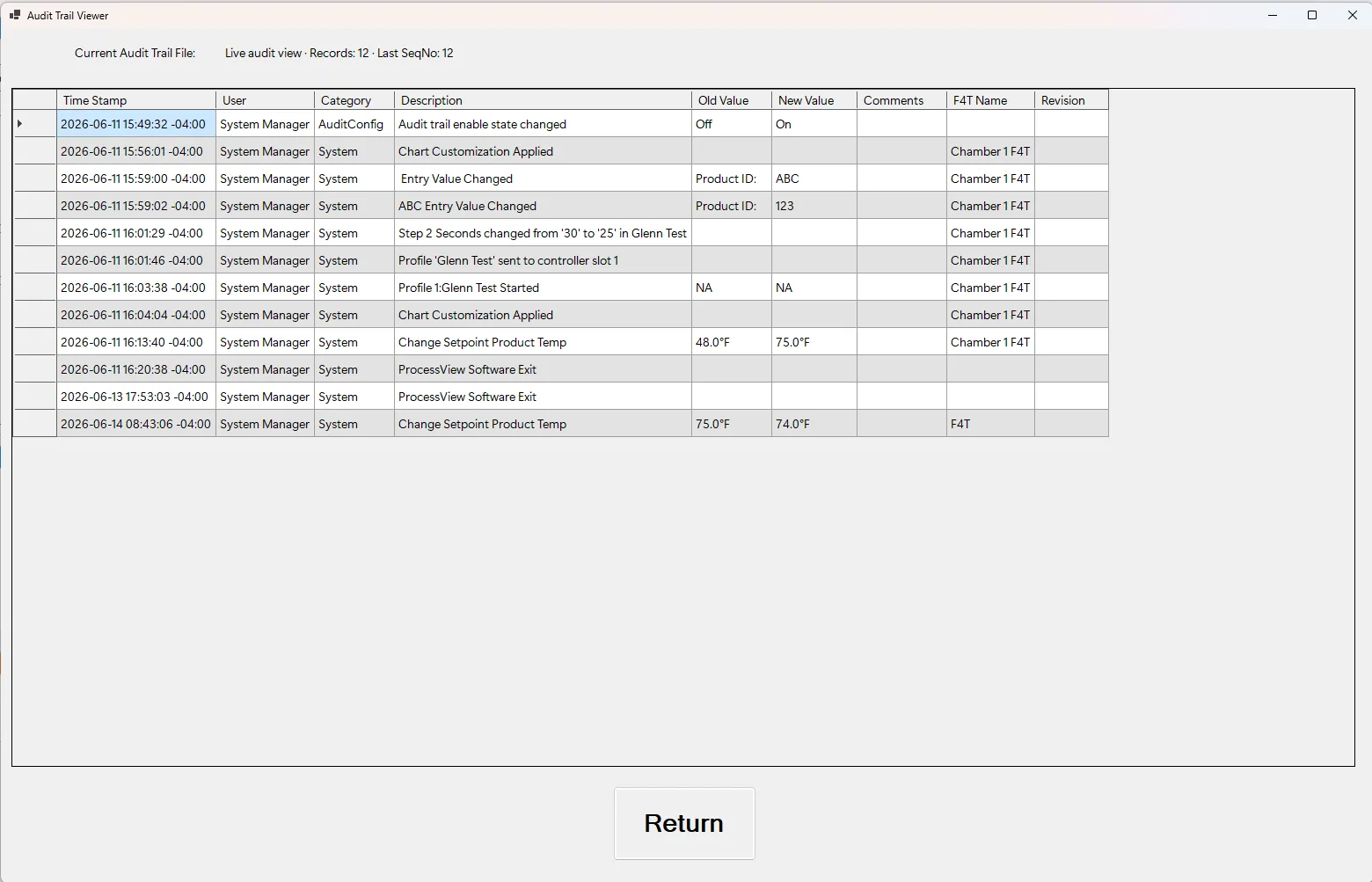
Audit trail
A time-stamped, computer-generated record of the actions taken through the application — who changed what, when, and why. Each record is hash-chained to the one before it with a keyed MAC, and the values it carries are encrypted with AES-256-GCM authenticated encryption, so that reviewers and inspectors see the full history. From version 1.38 ProcessView+ also protects the folder holding the audit database with Windows permissions, so an ordinary user account cannot delete or rename it — deletion being the one form of tampering a hash chain cannot detect, because the chain is held inside the file. Administrators of the machine keep full control, and backup and retention remain yours.
Electronic signatures
Each signer authenticates with their own signing PIN. The signature is cryptographically bound to the exact record signed and records the printed name of the signer — captured from their account at the moment of signing, not looked up when a record is later printed — together with the meaning of the signing and a UTC timestamp in the tamper-evident audit trail. It is the equivalent of a handwritten signature on paper records.
Tamper-evident records
Every audit record is hash-chained to the one before it with a keyed MAC, and the values it carries — old value, new value, comment, and reason — are encrypted with AES-256-GCM, so the record carries its own integrity check. An audit database created by a version earlier than 1.39 is keyed differently: it is protected under a value carried in the software rather than one belonging to the machine, so a party holding a copy of ProcessView+ could read its protected fields and could alter a record and recompute the chain so that verification still passes. Such a database is never converted by installing a newer version, and an installation holding one shows a standing notice saying so. Records stay accurate and attributable from creation through retention. You keep the original electronic records. We host nothing and receive no data from your chambers. Where you configure an external database, an MQTT broker or a file transfer, records go where you direct them and nowhere else.
Signatures bound to the record
Signatures are CMS/PKCS#7 with ECDSA P-256 and SHA-256, bound to the exact record signed rather than to a screen or a session. Each signing key is per-user and DPAPI-protected at current-user scope, so it can only be used by that Windows account on that machine.
Credentials never stored in the clear
Passwords and signing PINs are hashed with PBKDF2-HMAC-SHA256 at 600,000 iterations. Database credentials are protected by Windows DPAPI at machine scope, so that a saved connection works for any operator signed in to that PC. A signing PIN is personal and is not disclosed to anyone, including an administrator.
Role-based access
Five built-in roles — operator, technician, supervisor, QA reviewer, and administrator — limit who can run, edit, and administer. Signing authority is a separate per-user grant held on top of whichever role someone holds, so signing can be given to one operator without changing what any operator can do. Access controls keep responsibilities separated, a core expectation of any Part 11 system.
Rehearse without risk
Simulation Mode runs the full electronic-signature ceremony — plus SAT and TUS — against a built-in virtual F4T, so teams can train and validate procedures end-to-end. Simulated activity is kept out of your regulated audit trail, so a demo never pollutes real records.
What carries a signature
Four records can be signed, and each one shows the printed name of the signer, the meaning of the signature and the instant it was executed on its face: the QA Report, the Temperature Uniformity Survey certificate, the System Accuracy Test certificate, and the Analog Input Calibration certificate.
Every signature states its meaning
Signers choose from a defined set, so the audit trail records why each record was signed:
The formal Part 11 compliance statement is documented for the Watlow® F4T, whose front panel is locked so changes are routed through ProcessView+ rather than made at the controller itself. The software also runs Watlow F4, EZ-Zone® PM, and Future Design® MCT4 controllers.
Read the full compliance statement
A clause-by-clause matrix of how ProcessView+ addresses each Part 11 requirement, for the Watlow® F4T operated as a closed system — the document your quality team will want in the validation package.
For aerospace & defense QC
AMS 2750 thermal uniformity & Nadcap
AMS 2750 governs pyrometry for heat-treat operations. ProcessView+ turns your logged data into the surveys and records a Nadcap audit demands:
AMS 2750 TUS reports
Generate thermal uniformity survey (TUS) reports automatically from logged sensor data, with the layout and statistics heat-treat auditors expect — no manual spreadsheet work.
Calibration & SAT records
Keep calibration and system accuracy test records organized and retrievable, tied to the chambers and instruments they cover.
Nadcap-ready documentation
Full chamber qualification documentation, retained and exportable, so you walk into a Nadcap audit with the evidence already assembled.
A note on validation
ProcessView+ provides the technical controls — audit trail, electronic signatures, tamper-evident records, access control, and reporting — that support a 21 CFR Part 11 or AMS 2750 compliant process. Demonstrating compliance also depends on your own procedures, validation, and documentation in your environment. We're glad to support your validation effort; for formal regulatory or legal sign-off, consult your quality and regulatory professionals.
Product security and the EU Cyber Resilience Act
Compliance for a regulated lab is not only about records. If you are assessing us as a supplier — or you have been asked where we stand on the EU Cyber Resilience Act — these are the pages your quality or IT team will want:
- The Cyber Resilience Act and ProcessView+ — the two dates that matter, what we have done, and what it means if you resell or integrate the software.
- Report a security vulnerability — our disclosure policy, with safe harbor for good-faith research. You do not need to be a customer.
- Security advisories — a stable place to look. None have been issued to date, and that page says so.
If you run ProcessView+ in a regulated environment, please register a security contact so we can reach the right person directly rather than hoping they see a web page.
Need to prove it to an auditor?
See exactly how ProcessView+ produces the records and reports your audit requires.